Getting Started with a Digital Guest Guide
A digital guest guide is the fastest way to reduce repetitive questions while giving guests a smoother, more confident stay. This guide is written for individual Airbnb and VRBO hosts who want a clear, step-by-step setup without guesswork.
How this guide was built: We organized the setup around the most common host workflows: capture property details, create guest-facing content, and share it in the right moments. The goal is a digital guest guide that works for both first-time guests and repeat visitors.
Why a Digital Guest Guide Matters
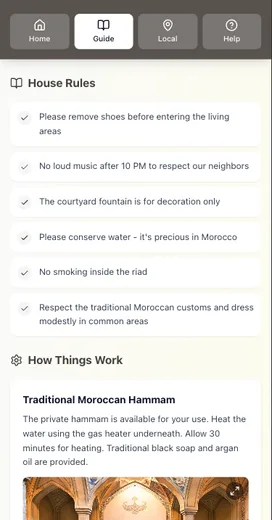
Modern guests expect immediate answers on their phone. A digital guest guide does three things that printed instructions cannot:
- Reduces repeat questions by centralizing answers in one place
- Keeps information current so guests do not follow outdated steps
- Improves the overall experience with clear, visual directions
Digital Guest Guide Setup: Step by Step
Getting started is simpler than it looks. Follow these steps in order and you will have a usable guide in a single sitting.
Step 1: Create Your Account
Set up your account, choose a plan, and get access to the guide builder.
Step 2: Add Property Details
Include the basics that guests always need:
- Property information: Name, address, check-in window
- Photos: Clear shots of every room and the entry
- Amenities: Everything guests can use
- House rules: Short, clear, and consistent
Step 3: Build Your Guest Content
Focus on the information guests search for most:
Welcome message
- Brief intro and expectations
- Contact information
Check-in instructions
- Parking details
- Entry code or key location
- WiFi credentials
Property features
- Thermostat and appliance use
- Entertainment systems
- Anything unusual or easy to miss
Local recommendations
- Food and coffee nearby
- Grocery and pharmacy options
- Emergency contacts
Step 4: Personalize the Guide
This is where the guide becomes memorable:
- Add a warm, host-specific welcome
- Include recommendations you would give a friend
- Use photos that match the real space
Step 5: Share It With Guests
Deliver the guide at the right moments:
- Send it after booking confirmation
- Re-send it 1–2 days before arrival
- Keep it accessible during the stay
Digital Guest Guide Best Practices
Writing Style That Guests Read
- Use short paragraphs and bullet points
- Write for mobile screens first
- Keep instructions specific, not abstract
Visual Clarity
- Use bright, natural lighting in photos
- Show the entry, parking spot, and key pickup
- Add simple labels to reduce confusion
Organization That Scales
- Group related info together
- Use descriptive headings
- Include a quick table of contents if the guide is long
Common Digital Guest Guide Mistakes
Too Much Information
Guests want fast answers, not a wall of text. Focus on the essentials and link out to deeper details if needed.
Outdated Instructions
Review your guide monthly and update anything that changed since the last stay.
Generic Tone
Hosts win more trust when the guide feels personal. Replace generic phrasing with your own voice.
Measuring Success
Track these signals over time:
- Fewer repetitive guest questions
- Faster check-ins and fewer arrival issues
- More consistent 5-star communication reviews
Conclusion: Build a Digital Guest Guide That Works
A digital guest guide works best when it is clear, current, and genuinely helpful. If you apply the steps above, you will reduce friction for guests and save yourself time every week.
Key Takeaways
- A digital guest guide reduces repeat questions and improves confidence on arrival.
- A simple structure beats a long, complicated document.
- Personalization matters as much as accuracy.
- Regular updates keep the guide trustworthy.
Ready to start? Create your free guide today and give guests the clarity they expect.