Airbnb Template Messages: Personalize Fast, Stay Efficient
Airbnb template messages save time, but they often create new work: follow-up questions, confusion, and lower review scores. This is the copy-paste trap - your messages are fast, but not specific.
The goal isn’t to stop templating. It’s to make templates feel personal and answer the real question.
How we’re deciding what “good messaging” is
This guide prioritizes three measurable outcomes that map to Airbnb’s guest experience:
- Fewer back-and-forth messages (the guest gets the answer the first time).
- Less arrival confusion (check-in and parking are clear and scannable).
- More consistent communication scores (guests feel supported without feeling “canned”).
Everything below is built around speed and clarity - not writing longer messages.
Why generic messages backfire
Airbnb asks guests to rate communication and check‑in separately, and overall rating is its own category. That means unclear or generic instructions can show up in reviews even if your home is great. See Ratings for homes.
Airbnb also expects hosts to respond within 24 hours to maintain response rate, and slower responses can affect response metrics and search placement. See Response rate and time and Why hosts are asked to respond within 24 hours.
Generic templates often fail because they:
- Don’t answer the specific question (guest asks about parking, you send a full check‑in script).
- Bury the answer in long paragraphs (people scan, they don’t read). See NN/g on how people read on the web.
- Arrive at the wrong time (info sent too early or too late to be useful).
The fix: fast + specific + timed
1) Keep the template, but add a 1‑sentence personalization
A simple sentence proves you read their message and makes the rest feel relevant.
Example:
- Guest asks: “Can we park two cars?”
- Your reply: “Yes—two cars are fine. One in the driveway, one on the street.”
- Then paste your standard check‑in instructions.
2) Put the answer first
If the guest asked a question, lead with the answer in the first line. Everything else can follow.
Bad: “Thanks for booking! Here are check‑in details…”
Better: “Yes, you can park in space #2. Here are full check‑in details below.”
3) Split long messages into scannable chunks
People skim. Use short sections and bullets.
Structure that works:
- Parking: two bullet points
- Entry: three steps
- WiFi: network + password
- House basics: 2–3 bullets
4) Time your messages to when they matter
Airbnb shows check‑in instructions in the app about 48 hours before arrival, which means guests often ask earlier. See Where to find your check‑in instructions and Contacting hosts.
Timing that reduces messages:
- 48–72 hours before arrival: access, parking, WiFi
- Day of arrival: confirmation + quick reminder
- Day before checkout: 2–3 step checkout list
A plug‑and‑play message structure (copy this)
Hi [Name] — yes, [direct answer to their question].

Here are the essentials for your stay:

Parking: [1–2 bullets]
Entry: [3 steps]
WiFi: [network + password]
House basics: [2–3 bullets]

If anything is unclear, just reply here.
This keeps the answer first while still saving time.
When templates do help
Templates are great for:
- Pre‑arrival reminders
- Day‑of arrival check‑ins
- Checkout instructions
Just make sure each one has a short personalization line when a guest asked a specific question.
Want fewer messages without writing more?
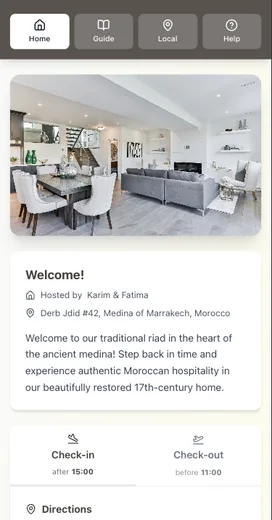
A digital welcome guide keeps answers in one place so guests can self-serve. If you want to improve communication without increasing workload, start with Why Your Airbnb Guests Keep Asking the Same Questions or How to Share WiFi Password Airbnb: 7 Host Methods.
Conclusion
Airbnb template messages work best when you treat them like a framework, not a script. Put the direct answer first, add one personalization line, and keep the rest scannable. You’ll save time and cut down on the follow-up questions that create busywork.
Key takeaways:
- Communication is a rated category, and unclear messages can hurt reviews. See Ratings for homes.
- Airbnb expects 24-hour responses to maintain response rate. See Response rate and time.
- Put the direct answer first and keep the rest scannable.
- Template messages work best when you add one line of personalization.
If you want to answer the same questions without repeating yourself, put check-in, WiFi, and house basics in a digital guide guests can open anytime. Be My Guest helps you centralize info so your messages can stay short.
Resources
Related posts
- Why Your Airbnb Guests Keep Asking the Same Questions
- The Real Cost of Being an Airbnb Host: A Time Breakdown
- How to Share WiFi Password Airbnb: 7 Host Methods
- Five-Star Airbnb Reviews: What 1,000 Reviews Reveal