How to Share WiFi Password Airbnb: 7 Host Methods
If you’re searching for how to share WiFi password Airbnb, you’re probably tired of the same check-in message: “What’s the WiFi?” If guests can’t get online in 30 seconds, you’ll get a message.
This guide compares 7 common ways hosts share WiFi passwords, explains the pros and cons of each, and recommends the most reliable approach.
How we’re comparing methods (so it’s not just opinions)
We’re judging each WiFi-sharing method on four real-world criteria:
- Speed: can a first-time guest connect in under a minute?
- Findability: can they find it again later without texting you?
- Update risk: does it break when you change the password/router?
- Accessibility: does it work for non-techy guests (and low signal moments)?
Why WiFi access matters more than you think
Airbnb explicitly asks guests to rate communication and check‑in, and the overall rating is its own category (not an average). If guests have trouble getting online, they often message you immediately—and that friction can show up in those ratings. See Ratings for homes.
7 ways hosts share WiFi passwords (with pros and cons)
1) Printed WiFi card (classic)
Pros: Fast, easy, familiar.
Cons: Becomes outdated when the password changes. Often gets misplaced.
Best for: Simple stays with low turnover.
2) Frame on the wall
Pros: Always visible; no hunting.
Cons: Can be an eyesore; still static.
Best for: Properties with stable WiFi credentials.
3) Message inside the Airbnb app
Pros: Already where guests are communicating.
Cons: Buried in message threads; hard to find later.
Best for: Short‑notice bookings.
4) Welcome binder
Pros: One place for all instructions.
Cons: Guests don’t always open it; outdated info risk.
Best for: Longer stays with curious guests.
5) QR code on a card
Pros: Fast to scan; can link to updated info.
Cons: Requires a phone with camera and a working QR scanner.
Best for: Mobile‑first guests.
6) Smart WiFi with easy guest login
Pros: No password sharing at all; seamless.
Cons: Requires a specific router or captive portal setup.
Best for: Hosts who want hands‑off access management.
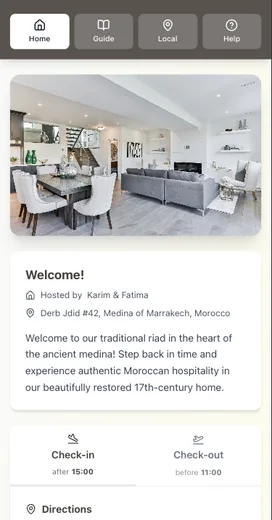
7) Digital welcome guide (single source of truth)
Pros: Always current; includes WiFi + everything else; easy to link.
Cons: Needs initial setup.
Best for: Hosts who want fewer messages long‑term.
The best method (for most hosts)
If you want the lowest friction, the best setup is:
- WiFi card in the home (visual + immediate)
- Digital guide link (for backup and full info)
- Message reminder (sent 48–72 hours before arrival)
This covers all guest types: visual learners, phone‑first guests, and those who want a deeper guide.
A simple WiFi card template
WiFi Network: _____________
Password: ________________
Support: Text host at ______
Add a QR code linking to your full guide or troubleshooting page.
Why this reduces guest questions
When WiFi details are visible, repeatable, and easy to find, guests self‑solve. That lowers your message load and improves check‑in and communication scores.
Airbnb expects hosts to respond within 24 hours to inquiries and reservation requests, and response rate affects search visibility. Fewer questions means fewer interruptions. See Airbnb’s response-rate and inquiry guidance.
Conclusion
The best answer to how to share WiFi password Airbnb is simple redundancy: a visible WiFi card, a digital backup, and a timely reminder before arrival. Guests connect faster, you get fewer messages, and check-in feels smoother.
Key takeaways:
- The best method is redundant: card + digital guide + reminder.
- Printed cards are easy, but fragile without a backup.
- A digital guide keeps WiFi info current and reduces repeat questions.
- Clear WiFi access protects check-in and communication ratings.
If you want one link that always stays up to date, put WiFi (and everything else) in a digital welcome guide. Be My Guest makes it easy to update WiFi details in seconds and share one mobile-friendly link with every guest.
Resources
Related posts
- Why Your Airbnb Guests Keep Asking the Same Questions
- The Real Cost of Being an Airbnb Host: A Time Breakdown
- Five-Star Airbnb Reviews: What 1,000 Reviews Reveal
- The Superhost Secret Weapon