Airbnb Welcome Guide: When Listings Outshine Your Guide
When your listing looks great but guests keep asking the same questions, the problem isn’t your photos - it’s the gap between your listing and your Airbnb welcome guide.
Airbnb asks guests to rate accuracy and check‑in separately, and overall rating is its own category. That means a beautiful listing can still earn lower scores if guests struggle to enter or find key info. See Ratings for homes.
How we’re diagnosing the “gap” (so you can spot it fast)
We’re using three signals most hosts can measure without any tools:
- Repetitive questions (WiFi, parking, check-in steps, thermostat, trash day).
- Friction moments (arrival and checkout) where guests are most likely to message.
- Mismatch between what the listing promises (self check-in, amenities, parking) and what the guide actually explains.
Then we align your guide to the same story your listing tells.
Why the gap happens
Two Airbnb policies make this more likely:
-
Guests don’t see detailed check‑in instructions until about 48 hours before arrival. See Where to find your check‑in instructions.
-
Checkout instructions are visible earlier than check‑in details. See Add check‑in and checkout instructions.
So if your listing promises an easy stay but your guide is incomplete, guests fill the gap by messaging you.
The alignment plan (make listing and guide tell the same story)
Step 1: Match the listing’s claims to the guide
Airbnb’s quality guidance stresses accuracy: photos, amenities, and descriptions should match the actual stay, including seasonal changes. See Maintaining quality.
Checklist:
- If your listing says “self check‑in,” your guide must show exact steps.
- If you highlight amenities, show where they are and how to use them.
- If you advertise parking, show a photo of the spot.
Step 2: Turn listing highlights into first‑10‑minutes answers
Airbnb recommends step‑by‑step check‑in instructions and photos. See Maintaining quality.
Do this:
- Create a “first 10 minutes” section in your guide.
- Include lockbox, keypad, or smart‑lock steps with photos.
- Put WiFi and thermostat basics on page one.
Step 3: Shrink the guide to the essentials
Guests are most likely to read short, clear guides. Long documents get skipped. Your goal is clarity, not completeness.
Keep these up front:
- Access steps
- Parking
- WiFi
- House basics
- Checkout steps
Step 4: Use Airbnb’s tools to reduce mismatches
Airbnb lets you add check‑in instructions and methods in your Listing editor, which keeps the platform details consistent with your guide. See Add check‑in and checkout instructions.
A quick self‑audit (10 minutes)
Ask yourself:
- Does the listing say one thing, but the guide explain it differently?
- Would a guest know how to enter the home without messaging me?
- Are amenities in the listing actually usable without extra instructions?
If any answer is “no,” your guide needs tightening.
Want a simple fix you can do today?
Start with three updates:
- Add a step‑by‑step check‑in section with photos.
- Put WiFi and parking on page one.
- Remove anything that’s out of date.
These three changes usually cut guest messages in half.
Conclusion
Your Airbnb welcome guide is the bridge between “great listing” and “great stay.” When the guide repeats and reinforces what the listing promises - especially around check-in, WiFi, and house basics - you get fewer questions, smoother arrivals, and more consistent reviews.
Key takeaways:
- A strong listing can still earn weaker reviews if the guide is unclear.
- Airbnb delays detailed check-in instructions until about 48 hours pre-arrival.
- Airbnb recommends step-by-step check-in instructions and photos.
- Aligning listing claims with guide details is one of the fastest fixes.
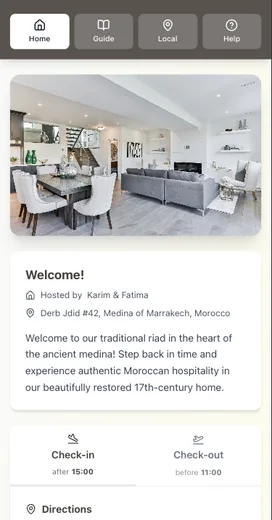
If you want to make this alignment easier to maintain, put your Airbnb welcome guide in a digital format you can update in seconds. Be My Guest helps you keep check-in, WiFi, rules, and local tips in one mobile-first place.
Resources
Related posts
- Why Your Airbnb Guests Keep Asking the Same Questions
- How to Share WiFi Password Airbnb: 7 Host Methods
- Five-Star Airbnb Reviews: What 1,000 Reviews Reveal
- The Real Cost of Being an Airbnb Host: A Time Breakdown