Automation Without Losing Personal Touch: Host Message Map
Automation can save hours, but it can also make your hosting feel generic if you’re not careful. This guide is about automation without losing personal touch: send the right message at the right time, with a human tone.
You’ll learn what to automate, what to keep personal, and a simple “message map” you can reuse for every stay.
Why “personal” still matters (even with automation)
If your messages feel generic, it shows up in guest sentiment (especially in reviews). And personalization expectations are high: McKinsey reports that 71% of consumers expect personalized interactions and 76% get frustrated when they don’t receive them. (McKinsey)
So the solution isn’t “no automation.” It’s smart automation with thoughtful personalization.
How we built this framework (so you can trust it)
This is based on two practical constraints hosts deal with:
- Guests need clear, consistent essentials (check-in, WiFi, rules, checkout).
- Guests also respond to small, specific signals that a real person is paying attention.
The steps below combine Airbnb’s own messaging tools (quick replies + scheduled quick replies) with a repeatable structure you can customize in under a minute. (Airbnb quick replies, Airbnb scheduled quick replies)
The framework: automate the repeat, personalize the moment
Use this simple rule:
- Automate anything that is predictable and repeatable.
- Personalize anything that feels unique to the guest, the stay, or the situation.
Automate these (always)
- Check‑in steps
- WiFi + parking info
- House rules
- Checkout instructions
- Key troubleshooting steps
Keep these personal (always)
- A welcome line that references their stay (dates, reason, group size)
- A local tip tied to their profile (family‑friendly, foodie, hiking)
- A short check‑in message after the first night
Airbnb’s quick replies and scheduled quick replies are built for this. You can insert details (like guest name and check-in date) into templates and schedule them by event, while still reviewing/editing before they send. (Airbnb scheduled quick replies)
Step 1: Create your message map
List the moments when guests need information:
- Booking confirmation
- Pre‑arrival (48–72 hours before check‑in)
- Check‑in day
- First night
- Day before checkout
Now assign two message types to each moment:
- Automated core info (same every time)
- Personal touch (one sentence you can customize)
Example:
- Pre‑arrival message
- Automated: address, entry steps, parking, WiFi
- Personal touch: “If you’re celebrating something special this trip, tell me—I’d love to help.”
Step 2: Build quick replies that still feel human
Use Airbnb’s quick replies to store your templates and insert personalized details. This keeps your messages fast and accurate.
Template tip: Keep the first line personal, then drop into the structured info.
Example:
“Hi [Guest First Name]—excited to host you this weekend. If you’re driving, the easiest parking spot is the one marked 2B. Here are your check‑in steps: …”
Step 3: Schedule the predictable moments
Set up scheduled quick replies for:
- 2–3 days before check‑in
- Morning of check‑in day
- Day before checkout
Airbnb lets you schedule quick replies based on those triggers and review or edit them before they go out, which keeps the tone personal while saving time.
Step 4: Add one “human moment” per stay
Pick one moment to send a fully personal message—no template. This can be a short note like:
- “Hope the drive wasn’t too rough—if you want a quiet dinner spot, try…”
- “Since you mentioned hiking, here’s a trail that’s great this time of year.”
This is where guests feel the “personal touch” most.
Step 5: Put the essentials in one guide
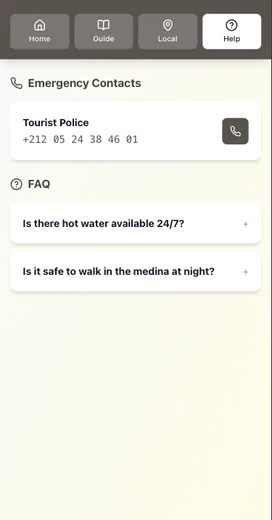
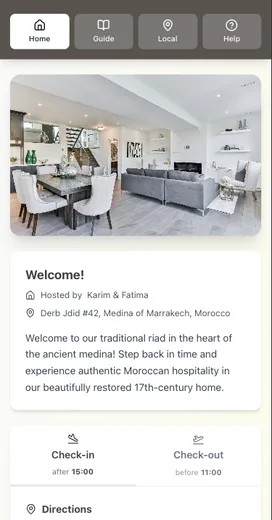
A guide gives you a single source of truth so your automated messages can stay short. Instead of pasting huge blocks of text, you can share one link.
If guests are still asking repeat questions, read: Why Your Airbnb Guests Keep Asking the Same Questions (And How to Stop It).
A quick “automation without losing touch” checklist
- Create 5–7 quick replies with details inserted
- Schedule pre‑arrival, check‑in, and checkout messages
- Keep the first line personal in every template
- Send one fully personal message per stay
- Link to one guest guide as the source of truth
Want the guest communication workflow diagram?
We built a Guest Communication Workflow Diagram that shows what to automate and where to add the human touch—so you can save time without feeling robotic.
Conclusion
If you want automation without losing personal touch, focus on structure, not scripts:
- Automate the repeatable essentials (check-in, WiFi, rules, checkout).
- Personalize the first line of every message (one sentence is enough).
- Schedule the predictable moments, then keep one “human moment” per stay.
- Put the full details in a single guide link so messages stay short and clear.
If you want a fast way to centralize your check-in and checkout instructions (and keep them updated), try building a digital guide in Be My Guest.
Related reading:
- Why Your Airbnb Guests Keep Asking the Same Questions (And How to Stop It)
- Creating the Perfect Check‑In Experience (Without Being There)
- How One Host Saved 10 Hours Per Week (And You Can Too)
Resources
Related posts
- How One Host Saved 10 Hours Per Week (And You Can Too)
- Creating the Perfect Check‑In Experience (Without Being There)
- The Mobile‑First Welcome Guide: Why Desktop Doesn’t Matter
- Why Your Airbnb Guests Keep Asking the Same Questions (And How to Stop It)
External sources