Save Time Hosting: How One Host Saved 10 Hours Per Week
If hosting feels like a second job, you’re not imagining it. If you want to save time hosting, it usually comes down to a small number of repeat questions, last-minute arrivals, and check-in clarifications.
This post shows a repeatable workflow that can cut that time down. It’s based on a realistic host schedule and the communication tools already built into Airbnb (like quick replies and scheduled messages). You’ll also get a simple time‑savings model to plug in your own numbers.
The core idea: reduce repeats, not responsiveness
The goal isn’t to respond slower. It’s to answer common questions before they’re asked—and to do it in a way that still feels personal.
Airbnb’s Messages tools are designed for exactly this: quick replies (message templates), scheduled quick replies, and reusable details you can personalize for each guest. These are built for reducing repeat work without losing clarity.
The workflow that saved ~10 hours per week
Here’s the 4‑part system that consistently cuts host time:
-
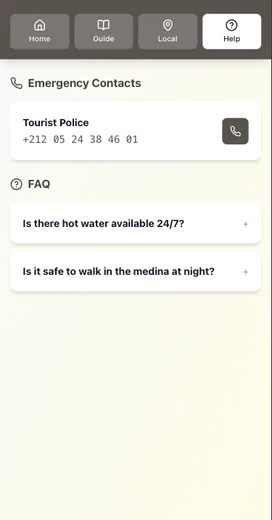
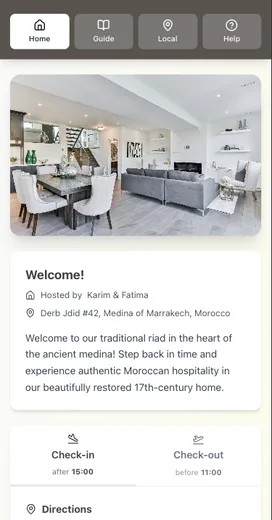
Centralize guest info in one guide Use a digital guide as the source of truth (check‑in steps, WiFi, parking, rules, checkout).
-
Create 6–8 quick replies Common topics: check‑in steps, parking, WiFi, early check‑in, late checkout, house rules, troubleshooting.
-
Schedule your core messages Airbnb lets you schedule quick replies based on events (booking, pre‑arrival, checkout). This means your “what you need to know” message goes out automatically at the right time.
-
Add a backup offline option A one‑page printed quick‑start or a downloadable PDF prevents the “no signal, no access” messages at arrival.
If you want the check-in structure, see: Creating the Perfect Check-In Experience (Without Being There).
The time‑savings model (use your own numbers)
This isn’t a promise. It’s a model you can customize. Here’s a realistic scenario for a 1–2 property host:
Assumptions:
- 8 reservations per month
- 6 repeat‑question messages per reservation
- 2 minutes per message (open, read, respond)
- 10 minutes per reservation for check‑in/checkout reminders
Baseline time:
- Messages: 8 × 6 × 2 minutes = 96 minutes
- Check‑in/checkout reminders: 8 × 10 minutes = 80 minutes
- Total = 176 minutes (nearly 3 hours) per month
Now scale that to a busier season or a higher‑turnover property (say 20 reservations/month):
- Messages: 20 × 6 × 2 minutes = 240 minutes
- Check‑in/checkout reminders: 20 × 10 minutes = 200 minutes
- Total = 440 minutes (7.3 hours) per month
Add:
- last‑minute “how do I get in?” messages
- missing info follow‑ups
- mid‑stay questions that could be answered in your guide
…and 10 hours per week can happen fast.
With automation:
If quick replies and scheduled messages cut those repeat messages in half, that’s an immediate 3–5 hours saved in busy months—more if you’re running high occupancy or multiple properties.
Why this works (and why it doesn’t feel robotic)
Quick replies can still feel personal because they use guest‑specific details (name, dates, listing info). Airbnb supports these “details” fields so your templates don’t feel copy‑pasted.
You can also edit a scheduled message before it goes out, so it feels customized without starting from scratch.
A realistic “before vs after” snapshot
Before:
- 20–30 guest messages per week
- 5–10 minutes each day checking for repeat questions
- Frequent last‑minute arrivals needing clarification
After:
- Guests get one pre‑arrival link that answers 80% of questions
- Scheduled messages handle the timing
- You focus on exceptions, not repeats
If you’re still getting repeat questions, read: Why Your Airbnb Guests Keep Asking the Same Questions (And How to Stop It).
The 10‑hour‑savings checklist
If you want the biggest impact fastest, start here:
- Move check‑in, WiFi, parking, rules, and checkout into one guide
- Create 6–8 quick replies for common questions
- Schedule your pre‑arrival and checkout messages
- Add a one‑page offline quick‑start sheet
- Review your guide once per month
Want the workflow diagram?
We built a Guest Communication Workflow Diagram that shows exactly when to send each message (booking, pre‑arrival, check‑in day, checkout). It’s a simple map you can plug into your current routine.
Conclusion
To save time hosting without dropping the ball, focus on reducing repeats and tightening timing:
- Put essentials (check-in, WiFi, parking, rules, checkout) in one guide as the source of truth.
- Use quick replies for common questions and scheduled quick replies for predictable moments.
- Keep one offline backup so arrival doesn’t depend on a good signal.
- Review and refresh your guide monthly so templates stay accurate.
If you want a simple way to centralize your check-in and checkout details in one place, try building a digital guide in Be My Guest and sharing a single link.
Related reading:
- Why Your Airbnb Guests Keep Asking the Same Questions (And How to Stop It)
- Creating the Perfect Check‑In Experience (Without Being There)
- The Offline Advantage: Why Your Guest Guide Needs to Work Without WiFi
Resources
Related posts
- Why Your Airbnb Guests Keep Asking the Same Questions (And How to Stop It)
- The Offline Advantage: Why Your Guest Guide Needs to Work Without WiFi
- The Printable vs Digital Debate: We Settled It Once and For All
- Creating the Perfect Check‑In Experience (Without Being There)
External sources