The Anatomy of the Perfect Vacation Rental Welcome Guide
A “perfect” welcome guide isn’t the longest one. It’s the one guests can actually use in the moment: on a phone, under time pressure, with limited attention.
This post is a section‑by‑section blueprint you can copy. It’s designed for 1–2 property hosts who want fewer repeat questions, smoother check‑ins, and more five‑star reviews.

How we define “perfect” (the criteria)
We built this anatomy using four practical criteria:
- Findable: guests can locate answers fast (no hunting through old messages)
- Scannable: headings and bullets make it easy to skim
- Accurate: you can update the info quickly, so it stays correct
- Complete (but not bloated): it includes what guests actually need, not filler
This matches what Airbnb recommends for guidebooks: keep them brief, personal, and updated, and make them easy for guests to access. It also aligns with UX research showing people scan web content in predictable patterns (especially on mobile), so formatting matters as much as content.
The 6 parts every great guest guide includes
Think of your guide as a mini “help center” for your property. The best guides follow this exact structure.
1) Quick Start (the top 30 seconds)
This is the most important section in your entire guide.
Goal: answer the 5 questions guests ask on arrival.
Include:
- Address + unit identifier (“Unit 3B”)
- Parking in one sentence
- Entry method (lockbox/keypad/smart lock)
- WiFi name + password
- How to reach you (message first, phone for emergencies)
Formatting rules:
- Put this at the very top.
- Use a short bulleted list.
- Make the key fields easy to copy (WiFi name/password, code).
Example block:
“Quick Start\n\n- Address: 123 Maple St, Unit 3B\n- Parking: Use Spot #12 (marked)\n- Entry: Keypad on the front door (code in the next section)\n- WiFi: MapleHouse_5G / password: 4821maple\n- Help: Message us in Airbnb; call only for urgent issues”
2) Arrival Guide (make check-in boring)
Check‑in is the moment guests are most anxious. Your job is to reduce uncertainty.
Include:
- Step‑by‑step entry instructions (numbered)
- A “confidence cue” photo (“Look for the blue planter”)
- Backup entry method (what to do if the code fails)
- Quiet hours and neighbor notes (short, clear)
Airbnb supports both an arrival guide and self check‑in options, and it also supports a house manual for day‑to‑day details. Treat your arrival guide as the “get inside safely” module.
If you want a full arrival template, see: Creating the Perfect Check-In Experience (Without Being There).
3) House Manual (how the home works)
This is where you prevent the mid‑stay messages.
Airbnb describes the house manual as the place for day‑to‑day details (how things work, where to find items), and it’s only accessible to confirmed guests.
Include:
- Thermostat / HVAC basics
- Hot water / breaker panel note (simple)
- TV + streaming steps
- Trash and recycling (where, when)
- Laundry (if allowed)
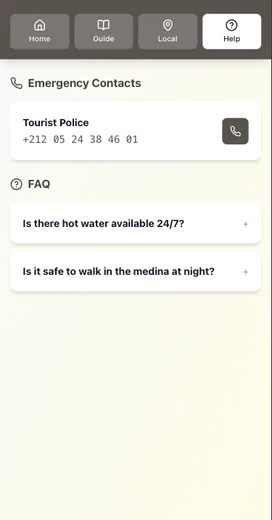
- Safety notes (smoke alarms, exits, emergency contacts)
Pro tip: don’t write essays. Guests scan. Use headings that describe the topic or purpose (this also aligns with WCAG guidance on descriptive headings and labels).
4) House Rules (short, specific, enforceable)
Rules work best when they’re:
- short
- grouped
- written as expectations (not scolding)
Structure your rules into 5 categories:
- Noise / quiet hours
- Smoking / vaping
- Pets
- Visitors
- Parking / shared spaces
If you’re using Airbnb, keep your listing’s official House Rules consistent with your guide.
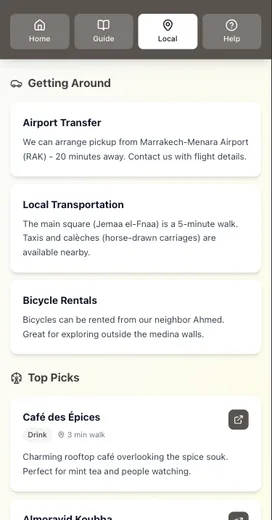
5) Local Guide (only the essentials)
Local recommendations are great—but they’re not the “core guide.” Keep this section tight.
Airbnb suggests keeping guidebooks brief, personal, and updated, and recommends highlighting what’s great about a place (what to order, what’s special).
Include:
- 3 coffee spots
- 3 meals
- 3 activities
- 1 grocery
- 1 pharmacy
That’s it. More can overwhelm.
6) Checkout (a checklist, not a paragraph)
Checkout is where good hosts lose time: last‑minute questions, forgotten steps, and awkward follow‑ups.
Include:
- Checkout time
- Where keys go
- Trash steps
- Towels / dishes expectations
- One “if you’re in a rush” minimum version
Put checkout in a checklist. Guests follow checklists better than paragraphs.
If you want the psychology behind why guests forget, read: Airbnb Checkout Instructions: Why Guests Forget Your Steps.
The formatting rules that make a guide usable
Great content still fails if it’s hard to scan.
Use these rules:
- Headings that say what’s inside (“WiFi” beats “Stay Connected”)
- Bullets over paragraphs
- One idea per block (guests skim)
- Put the most important info first (top of page, top of section)
UX research from Nielsen Norman Group shows people scan web content in patterns (including the well‑known F‑pattern), and they miss information that isn’t visually prioritized. Descriptive headings are one of the best antidotes.
The “one source of truth” rule (how to keep it accurate)
A guide only works if it stays current.
If you have:
- a printed binder
- a PDF
- and message templates
…you will eventually update one and forget the others.
Digital‑first systems reduce that risk because you update once.
If you’re product‑aware and deciding whether a dedicated platform is worth it, this is the practical benefit:
- One link in your pre‑arrival message
- One guide to update
- No “which version did I send?”
Conclusion: a welcome guide guests can actually use
If you want a “perfect” vacation rental welcome guide, focus on usability over length:
- Put a Quick Start at the top (arrival, WiFi, help).
- Make every section scannable (headings + bullets + photos).
- Keep everything accurate by updating one source of truth.
- Add safety valves (backup entry + offline fallback).
- Make checkout bulletproof with a checklist guests can follow in 60 seconds.
If you want a faster path, grab the template below and build your guide section-by-section.
Want the full welcome guide template?
We built a Perfect Welcome Guide Template (sections + copy blocks) you can use to build yours quickly.
If you’re already product‑aware and want the easiest way to keep everything accurate, Be My Guest is designed for this exact blueprint: a mobile‑first guide you can update once and share as one link (plus an optional offline‑friendly experience after first load).
If you want a plug-and-play checklist of what guests wish you’d included, see: Airbnb Guest Questions: 15 Things Guests Want to Know.
Resources
Related posts
- Before vs After: How Digital Guides Transform Guest Experiences
- Creating the Perfect Check‑In Experience (Without Being There)
- The Offline Advantage: Why Your Guest Guide Needs to Work Without WiFi
- Airbnb Checkout Instructions: Why Guests Forget Your Steps
- Airbnb Guest Questions: 15 Things Guests Want to Know
External sources