Property Management Tips for Airbnb Hosts (50+ Lessons)
When you host one property, you can get away with memory and good intentions.
When you manage 50+, you can’t.
Property managers who run big portfolios don’t magically have more willpower. They have systems that make the right thing the default: clear handoffs, repeatable checklists, and guest information that stays accurate.
These are the same property management tips for Airbnb hosts you can apply even if you only run one or two listings.
This post breaks down the exact playbooks property managers use at scale (based on platform documentation and industry standards) and shows how to copy them as a 1–2 property host.
What changes at 50+ listings
At scale, the job stops being “hosting” and becomes operations:
- Small mistakes become frequent (because volume).
- “One-off” problems become categories (parking, WiFi, lockouts).
- The cost of a missed detail multiplies (cleaning misses, wrong code, wrong time).
So property managers optimize for three things:
- Consistency (every guest gets the same clarity)
- Speed (issues get handled fast)
- Accuracy (the info is correct today, not last season)
Scaling isn’t doing more. It’s doing the same thing reliably.
The 7 systems property managers rely on (and how to copy them)
1) SOPs + checklists for everything that repeats
Property managers don’t “remember” turnovers. They run a standard process:
- clean
- restock
- inspect
- reset access
- stage the home
This is not just a hosting idea. In high‑risk environments like healthcare, checklists are used to reduce preventable errors (the WHO Surgical Safety Checklist is a famous example). The lesson for hosting is simple: when steps matter, a checklist beats memory.
Copy this as a small host:
- Create a one‑page turnover checklist (room by room).
- Create a separate “exceptions” checklist (spills, broken items, heavy‑use weekends).
- Add photos for subjective items (how pillows should look, where remotes go).
2) Clear roles and permissions (so tasks don’t float)
At 50+ listings, one person can’t do everything. Work is distributed across cleaners, maintenance, and co‑hosts.
Airbnb supports this with co‑hosting permissions and hosting teams, including the ability to assign tasks and manage who can message guests.
Copy this as a small host:
- If you have a cleaner or helper, give them one clear lane (turnover + photos).
- Define escalation rules: “Text me if X, otherwise log it in the checklist.”
- Keep guest messaging with one owner (to keep voice consistent).
3) A single source of truth for guest info
Big portfolios can’t afford outdated binders or scattered messages. The winning pattern is:
- one guide
- one link
- always current
Airbnb’s guidebook tools are designed to be easy to share and easy to keep updated, and guests can access them from the listing or Trips tab.
Copy this as a small host:
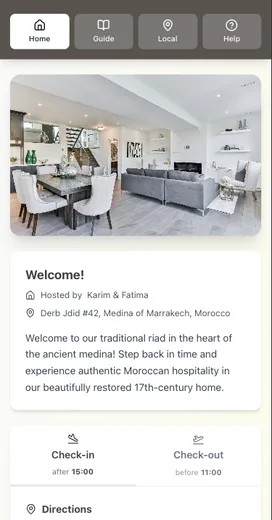
- Put check‑in, WiFi, parking, house rules, and checkout in one guide.
- Use the same structure every stay.
- Update the guide first, then update your message templates to point to it.
4) Message workflows (not “replying when you remember”)
Property managers treat messaging like a workflow:
- a pre‑arrival message at the right time
- a check‑in day message
- a first‑night check
- a checkout reminder
Airbnb supports this with quick replies and scheduled quick replies, so you can reuse templates and send them based on triggers.
Copy this as a small host:
- Create 6–8 quick replies for the most common questions.
- Schedule the predictable messages.
- Keep the first line personal, then link to your guide.
If you want a full framework, see: Automation Without Losing the Personal Touch: A How‑To Guide.

5) QA inspections (because cleaning isn’t the same as “ready”)
Professional vacation‑rental managers separate housekeeping from inspection. Industry standards from the Vacation Rental Management Association (VRMA) include expectations for housekeeping inspections before a guest arrives.
Copy this as a small host:
- Add a 5‑minute inspection pass after cleaning.
- Use a short checklist: entry photo, bathroom photo, kitchen photo, bed photo.
- Fix the top 5 repeat misses first (hair in shower, crumbs, low paper goods, remotes missing, trash).
6) Maintenance triage (so everything isn’t “urgent”)
At scale, managers use triage:
- Safety issues: handle immediately (gas smell, broken lock).
- Guest‑blocking issues: same day (no hot water, lock failure).
- Annoying but not blocking: schedule (loose cabinet, squeaky door).
Copy this as a small host:
- Add three severity labels to your maintenance log.
- Keep one “always on” list for your next handyman visit.
- Put troubleshooting steps in your guide (reset router, where breakers are).
7) A simple scoreboard (so you know what to fix)
Property managers track a small set of numbers so they can see what’s improving:
- Occupancy
- ADR (average daily rate)
- RevPAR (revenue per available room)
These are standard hospitality metrics used to evaluate performance.
Copy this as a small host:
- Track your monthly occupancy and ADR.
- After every 10 stays, scan reviews for repeat friction (“hard to find,” “confusing,” “WiFi”).
- Fix the top 1 issue first, then repeat.
The 60‑minute playbook you can do this weekend
If you want the biggest impact with the least effort:
- Write a 1‑page turnover checklist.
- Create a 1‑page inspection checklist.
- Put check‑in, WiFi, parking, rules, and checkout into one guide.
- Create 6 quick replies that link to the guide.
- Schedule pre‑arrival and checkout messages.
That’s the same “systems thinking” big operators use—scaled down to one property.
Want the property‑manager playbook in one place?
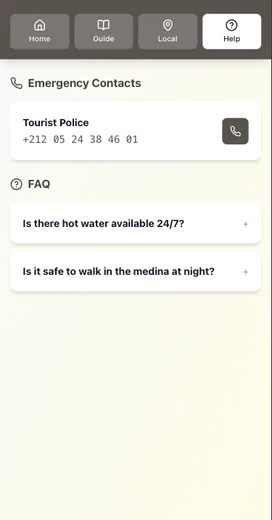
Be My Guest is built for this exact shift: from scattered messages and stale binders to one mobile‑first guide guests can actually use.
- Update information once (it stays current for every guest)
- Share one link in every message
- Works offline after the first load
- Optional AI assistant answers common questions based on your guide
If you’re product‑aware and ready to see what this looks like, start a free trial and build your first guide in an afternoon.
Conclusion: steal the systems, not the workload
The best property management tips for Airbnb hosts aren’t secret tools. They’re simple operating habits:
- Put repeat work into checklists (turnover + inspection).
- Keep guest info in one source of truth (one guide, one link).
- Deliver information with timed messages (pre-arrival, check-in, checkout).
- Build backups for high-stress moments (entry, WiFi, emergencies).
- Review your top friction points monthly and fix the #1 issue first.
If you want the fastest way to implement this, start with the 60-minute playbook above and turn your “system” into a guide link you reuse across every stay.
Resources
Related posts
- Before vs After: How Digital Guides Transform Guest Experiences
- Automation Without Losing the Personal Touch: A How‑To Guide
- How One Host Saved 10 Hours Per Week (And You Can Too)
- Creating the Perfect Check‑In Experience (Without Being There)
External sources
- Airbnb Help: Hosting teams (roles and tasks)
- Airbnb Help: Co-host permissions
- Airbnb Help: Use quick replies to save time
- Airbnb Help: Create scheduled quick replies
- Airbnb Help: Guidebooks on Airbnb (guest access)
- VRMA: Vacation Rental Management Standards (housekeeping and inspections)
- WHO: Surgical Safety Checklist (checklists reduce missed steps)
- STR: Hospitality KPI definitions (Occupancy, ADR, RevPAR)