Reduce Guest Questions: Answer Them Before They're Asked
If you want to reduce guest questions, the answer usually isn’t “type faster.” It’s building a system where guests can find the right answer at the exact moment they need it.
This post gives you that system.
It’s designed for product‑aware hosts (you already know digital guide tools exist) who want to reduce repeat questions without sounding robotic or ignoring guests.
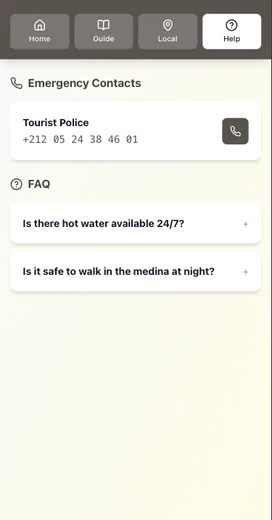
The mindset shift: you’re building a mini help center
The highest‑performing hosts don’t rely on memory or long message threads. They run a simple “help center” model:
- One source of truth (the guide)
- One delivery path (a link)
- A few timed messages (so guests see the right thing at the right time)
This works because guests don’t read like you wrote. They scan.
Nielsen Norman Group’s eyetracking research shows people scan web content (often in an F‑shaped pattern) and miss big chunks when text isn’t formatted for the web. That’s why your guide needs headings, bullets, and the most important info first.
Your job isn’t to write more. It’s to make the right answer impossible to miss.
Step 1: Build your “Top 25 guest questions” list
Don’t guess. Pull from what you already have:
- Your last 30 guest message threads
- The last 10 reviews (what did guests mention?)
- Your cleaning/turnover notes (what do guests struggle with?)
Start a list and group questions into 6 buckets:
- Arrival: address, parking, door, access code
- Basics: WiFi, thermostat, hot water, trash
- Rules: noise, visitors, smoking, pets
- Local: grocery, coffee, late-night food
- Fixes: “TV won’t work,” “WiFi dropped,” “where’s the breaker?”
- Checkout: time, keys, trash, towels
If you want examples of what guests ask most, start with: Why Your Airbnb Guests Keep Asking the Same Questions (And How to Stop It).

Step 2: Turn answers into scannable blocks (not paragraphs)
Most guest questions are answered better with:
- a heading
- 1 sentence of context
- 3–6 bullets
- a photo (when location matters)
Example: WiFi
WiFi
- Network: MapleHouse_5G
- Password: 4821maple
- If it won’t connect: restart the router (switch is behind the TV)
That’s it.
Why this works: NN/g recommends putting the most important points early and using headings and bullets so scanners don’t miss key information.
Step 3: Put answers in one guide (source of truth)
If your answers live in:
- a binder
- a PDF
- and message templates
…you will eventually update one and forget the others.
A digital guide solves “version drift” because you update one place.
If you need a full guide blueprint, use: The Anatomy of a Perfect Vacation Rental Welcome Guide.
Step 4: Deliver the guide before guests ask
The biggest win is preventing the “arrival panic” questions.
Use a simple timing rule:
- 48–72 hours before check‑in: send the guide link + parking + what to bring
- Check‑in day: resend the link + top 3 steps (where to go, how to enter, parking)
- First night: one human check‑in (“Everything going ok?”)
- Day before checkout: checklist + link
Airbnb’s scheduled quick replies are designed for this: you can send messages automatically based on triggers (booking, check‑in, checkout) and edit/skip an upcoming message before it sends.
Step 5: Use quick replies as your “fast lane” (not a wall of text)
Quick replies work best when they’re short and focused on one topic.
Airbnb explicitly frames quick replies as reusable templates for common guest questions, and supports inserting “details” (placeholders) so the message fills in guest and listing information automatically.
The best structure:
- 1 personal line
- 1 sentence telling them where the answer lives
- 1 link to the guide
Example:
“Hi Sam—excited to host you. The fastest way to find anything during your stay is the guide here: [link]. WiFi and check‑in steps are right at the top.”
Step 6: Add two safety valves (so automation doesn’t backfire)
A system fails when it has no backup.
Add these two safety valves:
- Backup entry method (lockbox/physical key) for smart locks
- Offline option (one‑page printed quick start or saved PDF)
That prevents the worst‑case scenario: guests standing outside with no signal.
If this happens to you, read: Creating the Perfect Check-In Experience (Without Being There).
Step 7: Track the “deflection rate” (the only metric that matters here)
You don’t need complicated analytics. Track one thing for 30 days:
- How many guest questions were answered by the guide (no message needed)?
A simple way:
- Keep a note: every time you answer a question that’s already in your guide, mark it.
- At the end of the month, move the top 3 “repeat offenders” higher in the guide.
This is the same logic customer support teams use: make self‑service easy, and volume drops.
Microsoft’s multichannel customer service research found that 92% of consumers surveyed expected an online self‑service support page/portal. Hosting is different, but the expectation pattern is the same: people want to find answers quickly on their own.
Where Be My Guest fits (if you’re already product-aware)
If you like this system but don’t want to build it from scratch in docs and PDFs, Be My Guest is designed around the same playbook:
- One mobile‑first guide guests can open on any phone
- Easy updates (so info stays accurate)
- One link to reuse in your messages
- Optional AI assistant that answers questions based on your guide content
Want the “Top 25 Questions” template?
We created a Top 25 Guest Questions Template (with the 6 buckets + copy blocks) so you can build your guide in one sitting.
Conclusion: reduce guest questions without sounding robotic
To reduce guest questions, you don’t need more automation. You need a clearer system:
- One source of truth: a single guide you keep updated
- Scannable answers: headings + bullets + “do this first” blocks
- Timed delivery: send the guide link before guests hit friction (arrival, first night, checkout)
- Quick replies as a fast lane: short messages that point back to the guide (not walls of text)
- Two safety valves: backup entry + offline fallback
If you want to implement this fast, start with the Top 25 template, build your guide’s “fast path,” and then drop the link into your scheduled messages.
If you want to go deeper next:
- Why Your Airbnb Guests Keep Asking the Same Questions (And How to Stop It)
- The Anatomy of a Perfect Vacation Rental Welcome Guide
Resources
Related posts
- Why Your Airbnb Guests Keep Asking the Same Questions (And How to Stop It)
- The Anatomy of a Perfect Vacation Rental Welcome Guide
- Automation Without Losing the Personal Touch: A How‑To Guide
- Creating the Perfect Check‑In Experience (Without Being There)
- The Mobile‑First Welcome Guide: Why Desktop Doesn’t Matter
External sources
- Airbnb Help: Use quick replies to save time
- Airbnb Help: Create scheduled quick replies (edit/skip before sending)
- Airbnb Resource Center: Using quick replies to save time
- Nielsen Norman Group: F‑Shaped Pattern of Reading on the Web
- Microsoft Dynamics 365 Blog: U.S. Multichannel Customer Service Report (self-service expectations)