Welcome Book Template Showdown: Pinterest vs Etsy vs Canva
If you’re building an Airbnb welcome book, you’ll run into the same three options over and over: Pinterest, Etsy, and Canva. The right choice depends on your welcome book template workflow - especially once you factor in updates, guest access, and the real time it takes to maintain your info.
This post compares the three so you can pick the right approach for your property and your hosting style.
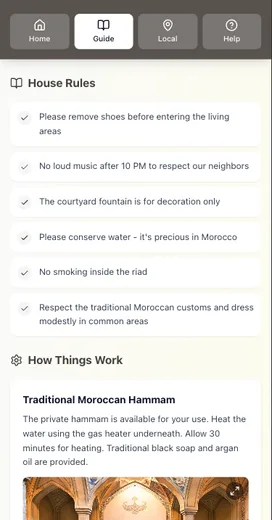
The decision most hosts don’t realize they’re making
You’re not just choosing a template. You’re choosing a system for how guest information lives and gets updated.
So we compared all three across five criteria:
- Speed to launch (how fast can you get a usable guide?)
- Update friction (how hard is it to change info?)
- Guest access (will guests actually find it?)
- Ownership + licensing (what are you allowed to reuse?)
- Long‑term maintenance (is this a one‑time task or a monthly chore?)
Pinterest: best for ideas, not finished guides
Pinterest is a visual idea board, not a publishing platform. It’s fantastic for:
- layout inspiration
- section ideas
- aesthetic direction
You can also add links to Pins so people can visit the source—but that only helps if the link stays visible on the Pin and your guests click it. Pinterest’s Help Center notes that the “Visit site” button may not always display if a landing page doesn’t meet quality or match guidelines, which is a risk if you want dependable access.
Bottom line: Pinterest is great for inspiration, but not a reliable delivery system for guest info.
Etsy: fast to buy, slower to update
Etsy is full of beautiful, affordable welcome book templates. The biggest benefit is speed: you can buy a ready‑made design and start editing immediately.
But Etsy templates are digital downloads. Etsy’s Help Center explains that digital files are accessed from your Purchases page and can’t be downloaded through the Etsy app. That adds friction if you’re trying to update a file on the go.
Tradeoffs:
- Great initial value
- Updates require manual edits and re‑exporting
- Guest access depends on you sending the file or printing it
If your info changes often (WiFi, parking rules, local recommendations), you’ll feel this quickly.
Canva: the most flexible template platform
Canva gives you a huge library of welcome book designs and makes it easy to edit on desktop or mobile.
Two key strengths:
- Speed to customize: change colors, swap photos, replace text quickly.
- Brand consistency: Canva’s Brand Kit (a Pro feature) lets you store logos, fonts, and colors for consistent design.
But Canva templates still live as files. You export, then distribute. And licensing matters: Canva’s Content License Agreement says Pro content is licensed for a single design use and can’t be redistributed as standalone content. That’s fine for one property, but it matters if you want to scale or reuse designs across multiple listings.
Side‑by‑side showdown
| Criteria | Etsy | Canva | |
|---|---|---|---|
| Speed to launch | Fast for ideas | Fast once purchased | Fast once chosen |
| Update friction | High (not a guide) | Medium (edit + re‑export) | Medium (edit + re‑export) |
| Guest access | Unreliable | You must send or print | You must send or print |
| Ownership | Link‑based | You own the file | Licensed content rules apply |
| Long‑term maintenance | Not designed for upkeep | Reprints add work | Re‑exports add work |
When a digital guide is the better move
A template is useful when your information rarely changes. But most hosts update something every season: WiFi, parking, instructions, recommendations, rules.
A digital guide makes those updates painless because:
- you update once, and every guest sees the latest version
- you can share a single link in every pre‑arrival message
- it reduces repetitive questions before check‑in
If you’re curious about the digital approach, start with: Canva Welcome Book vs Digital Guide: A Complete Comparison.
Decision guide: pick the right option for you
Choose Pinterest if:
- you need design inspiration and layout ideas
- you’re not ready to build a final guide yet
Choose Etsy if:
- you want a quick, low‑cost starting point
- you don’t mind exporting and re‑sending files
Choose Canva if:
- you want to customize design and visuals easily
- you want control over layout without hiring a designer
Choose a digital guide if:
- you change information more than once a quarter
- you want to reduce guest questions
- you prefer a single, always‑current source of truth
Want the comparison chart + template map?
We built a simple Template Showdown Chart and a Welcome Guide Content Template to help you decide what to keep, what to replace, and what to upgrade first.
Conclusion
Your best welcome book template isn’t the prettiest one - it’s the one you can keep accurate.
- Use Pinterest for inspiration, not delivery.
- Use Etsy when you want a fast starting point and don’t mind re-exporting.
- Use Canva when you want flexible design and easy edits (but you’re still managing files).
- If you update info more than once a quarter, a digital guide is usually the lowest-maintenance system.
If you want to reduce repeat questions and stop re-sending PDFs, keep your guide as a single link and pair it with a one-page printed quick-start sheet at the property.
Related reading:
- Canva Welcome Book vs Digital Guide: A Complete Comparison
- Printed Welcome Book Costs: Hidden Time, Errors, Waste
- Digital vs Printed Welcome Book: Criteria-Based Verdict
Resources
Related posts
- Canva Welcome Book vs Digital Guide: A Complete Comparison
- Why Superhosts Are Ditching Printed Welcome Binders
- Printed Welcome Book Costs: Hidden Time, Errors, Waste
- Airbnb Welcome Guide: When Listings Outshine Your Guide
External sources