Canva Welcome Book vs Digital Guide: A Complete Comparison
If you’re thinking, “Should I just design a Canva welcome book?”—you’re not alone. Canva templates are easy, pretty, and fast to customize. But a digital guest guide solves a different problem: keeping information accurate and accessible without extra work.
This comparison helps you choose based on how you actually host, not just what looks good.
Who this is for
You’re solution‑aware if you already know you need better guest communication—but you’re deciding which format makes sense:
- A Canva template (printed or PDF)
- A digital guide that lives online and updates in real time
Let’s break the decision down clearly.
How we compared Canva vs digital guides
We used five criteria that most one‑ or two‑property hosts care about:
- Update speed (what happens when WiFi changes?)
- Guest access (can guests find it without asking?)
- Accuracy over time (does it stay correct during a stay?)
- Ongoing maintenance (how much work does it add?)
- Guest experience (does it feel professional and easy?)
These same criteria show up in Airbnb’s own guidance to hosts: keep guidebooks brief and personal, review them to keep info accurate, and make them easy for guests to find on the listing or in their Trips tab. That’s the standard we’re aiming for.
Canva welcome book: the strengths
Where Canva shines:
- Beautiful design quickly. Templates make it easy to create a polished look.
- Brand consistency. Canva’s Brand Kit lets you store logos, fonts, and colors so everything looks consistent across designs.
- Print‑ready. If you love a physical binder on the counter, Canva makes it easy to export a high‑quality PDF.
What this looks like in real life:
- You buy a template (from Canva or Etsy), swap in your info, and export it.
- You print it or send a PDF in a message.
- Guests read it if they remember or find it.
Canva welcome book: the hidden tradeoffs
Here’s where Canva can feel “done” on day one and outdated by day 30:
-
Every change means editing and re‑exporting. WiFi passwords change. Parking rules shift. Check‑out steps evolve. Canva can handle edits, but the work is still on you.
-
Guest access depends on you sending it. A PDF is only helpful if guests open it at the right time. A printed binder is only helpful if they notice it.
-
Templates can look great but still feel generic. A polished design doesn’t automatically answer your guests’ actual questions.
-
Licensing matters for templates. Canva’s content license allows use of Pro content in a single design. That’s fine for one welcome book, but it’s a reminder that templates aren’t always “set it and forget it” for reuse or distribution.
Digital guest guide: the strengths
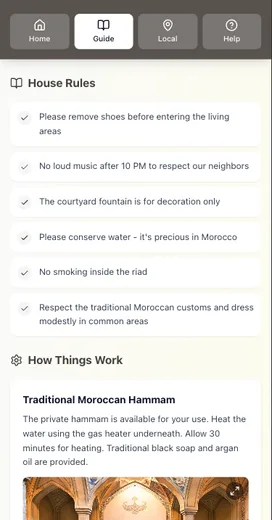
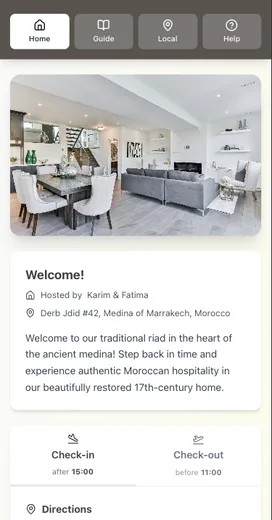
A digital guide is designed for access and accuracy.
Where it wins:
- Instant updates. Change one item once. All guests see the latest version.
- Easy access. You can share a link in your pre‑arrival message, or keep it in Airbnb’s ecosystem so guests can open it from their Trips tab.
- Less repeat messaging. When guests can see check‑in steps, WiFi, and house rules before arrival, the late‑night “Just checking…” messages drop.
This matches the way Airbnb positions guidebooks: easy to share, easy to keep updated, and accessible to guests through the listing and Trips tab.
Digital guides: where you still need to be intentional
Digital isn’t automatically perfect. The quality depends on what you include and how you structure it.
Common mistakes:
- Overloading guests with long paragraphs
- Burying the check‑in steps
- Treating it like a brochure instead of a help center
If your listing feels more polished than your guide, read: Airbnb Welcome Guide: When Listings Outshine Your Guide.
Side‑by‑side comparison
Here’s a quick, honest summary you can screenshot.
| Criteria | Canva Welcome Book | Digital Guest Guide |
|---|---|---|
| Update speed | Manual edits + re‑export | Instant updates |
| Guest access | Must open PDF or find binder | Link + mobile access |
| Accuracy | Drifts over time | Stays current |
| Maintenance | Reprint or resend | One‑time setup + quick edits |
| Guest experience | Polished but static | Polished and interactive |
Which should you choose?
Choose a Canva welcome book if:
- You want a printed binder on‑site.
- Your info rarely changes.
- Your guests tend to be less tech‑forward.
Choose a digital guide if:
- Your info changes monthly or seasonally.
- You want fewer repeat questions.
- You prefer sending one link instead of multiple messages.
Many hosts do both: a short printed “Quick Start” sheet plus a digital guide as the main source of truth.
The simple decision rule
If you update anything more than once a quarter, digital wins. If you almost never update anything, Canva can be enough—as long as you keep it accessible.
Want the comparison chart + content template?
We put together a simple Welcome Guide Content Template plus a one‑page Canva vs Digital comparison chart you can use to map your current setup and decide what to upgrade first.
Conclusion
If you’re deciding between a canva welcome book and a digital guide, the best choice depends on how often your info changes.
- If you want a printed binder on-site, Canva is a great design tool.
- If you want guests to find answers before arrival (and you want fewer repeat questions), a digital guide usually wins.
- If you update WiFi, codes, parking, or recommendations more than once a quarter, file-based PDFs get painful fast.
- The most reliable setup for many hosts is hybrid: a one-page printed quick start plus a digital guide as the source of truth.
If you want the low-maintenance option, start digital-first and keep the printed piece short.
Related reading:
- Digital vs Printed Welcome Book: Criteria-Based Verdict
- Welcome Book Template Showdown: Pinterest vs Etsy vs Canva
- The Offline Advantage: Why Your Guest Guide Needs to Work Without WiFi
Resources
Related posts
- Printed Welcome Book Costs: Hidden Time, Errors, Waste
- Why Your Airbnb Guests Keep Asking the Same Questions (And How to Stop It)
- Airbnb Welcome Guide: When Listings Outshine Your Guide
- Airbnb Checkout Instructions: Why Guests Forget Your Steps
External sources