Digital Welcome Guide: Why Superhosts Ditch Printed Binders
Printed welcome binders used to be the gold standard for hosts. But if you talk to top-rated hosts today, many are quietly retiring them in favor of a digital welcome guide. Not because binders are “bad,” but because guests now expect fast, mobile, always-current information.
This post breaks down why superhosts are ditching printed binders, what they’re replacing them with, and how to decide what’s right for your place.
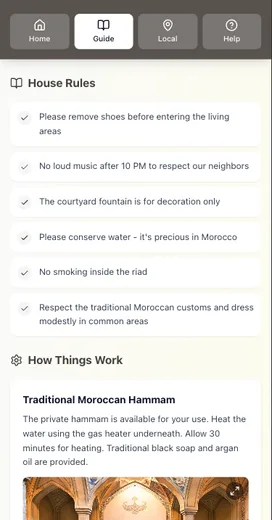
How we evaluated print vs digital
We compared printed binders and digital welcome guides across five real‑world criteria that matter to busy hosts:
- Update speed: How fast can you change info when something breaks or changes?
- Guest access: Can guests reach it without hunting or asking you?
- Accuracy: How likely is the info to be current during a stay?
- Time cost: How much host time does it take to maintain?
- Waste/redo cost: How often do you have to reprint or replace?
If your priorities are different (design, brand feel, or a luxury presentation), you might weigh these differently. But these five explain the shift we’re seeing.
Reason #1: Guests are mobile‑first now
Most guests arrive with a phone in hand and expect information to be there too. Pew Research Center data shows 91% of U.S. adults own a smartphone. That’s not a niche behavior anymore—it’s the default.
What this means for you: A binder on the kitchen counter can feel “invisible” compared to a link guests can open on their phone before they even arrive.
Practical move: Put the key info in a digital format guests can access in two taps—then keep a short printed backup for emergencies only.
Reason #2: Printed binders go stale fast
A printed binder looks polished on day one, but it drifts out of date quickly:
- Restaurant hours change.
- WiFi passwords rotate.
- Check‑out steps evolve.
- Access codes update.
Every change means a reprint, and that adds real friction. It also adds real waste. The EPA reports that paper and paperboard make up 23.1% of U.S. municipal solid waste, totaling 67.4 million tons in 2018. That’s a reminder that “just reprint it” scales poorly.
What this means for you: If you’re updating anything more than once a quarter, a binder becomes a maintenance task, not a helper.
The best guest guide is the one that stays accurate without extra work from you.
Reason #3: Digital guides match how Airbnb already works
Airbnb itself encourages hosts to keep information accessible in one place and easy to share. Their Resource Center notes that guidebooks are easy to share and update, and guests can access them from the listing, host profile, or their Trips tab. That means guests are already used to finding host info digitally.
What this means for you: A digital guide fits naturally into how guests plan and navigate a stay. It’s aligned with their default behavior.
Reason #4: Digital guides reduce repeat questions
A printed binder helps after arrival. A digital guide helps before arrival, which is when most repetitive questions show up.
When guests can review:
- check‑in steps
- parking details
- WiFi info
- house rules
…before they arrive, you don’t get the “Just checking on…” messages at 8 p.m.
If this is a pain point for you, read: Why Your Airbnb Guests Keep Asking the Same Questions (And How to Stop It).
Reason #5: The best digital guides feel personal
Hosts worry digital = generic. In reality, digital can be more personal because you can tailor it:
- Add your own voice in a short welcome message.
- Include local favorites you actually recommend.
- Update seasonally without reprinting anything.
This is the same idea we cover in: Airbnb Template Messages: Personalize Fast, Stay Efficient.
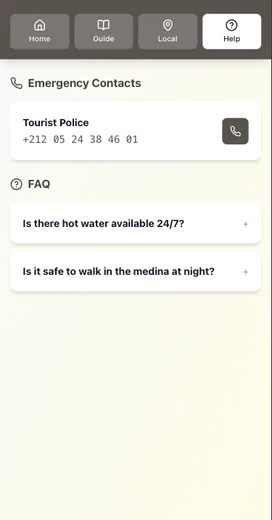
What superhosts do instead of printed binders
Here’s the pattern we see from top hosts who have upgraded their guest communication:
- Create a mobile‑first guide with the essentials (check‑in, WiFi, house rules, checkout).
- Link it in every pre‑arrival message so guests see it before they ask.
- Keep a one‑page printed backup in the home for emergencies.
- Review once per month to keep details current.
If you want a checklist of what to include, see: Airbnb Guest Questions: 15 Things Guests Want to Know.
When a printed binder still makes sense
Some hosts still keep a printed binder—and that can be smart if you treat it as a backup, not the primary source.
Use print when:
- Your guests skew older or less tech‑savvy.
- You have frequent WiFi issues.
- You want a premium, tactile touch.
But keep it short: a 1–2 page “Quick Start” sheet is usually enough.
The takeaway
Printed binders are not wrong. They’re just no longer the best primary system for most hosts. Digital guides win on speed, accuracy, and guest access—and that’s why more superhosts are moving in that direction.
Quick recap:
- Guests are mobile‑first, so your guide should be too.
- Printed binders go stale and take time to maintain.
- Digital guides reduce repetitive questions before arrival.
- The best approach is often digital‑first with a short printed backup.
Want the one‑page comparison chart?
We put together a simple Digital vs Print Welcome Guide Comparison Chart you can use when you’re deciding what to keep, cut, or rebuild.
Conclusion
Digital welcome guide systems win because they match how guests behave and how information changes in the real world:
- Guests are mobile-first, so access needs to be one or two taps.
- Printed binders go stale fast when codes, WiFi, or recommendations change.
- Digital guides reduce repeat questions because guests can review before arrival.
- A hybrid setup is often best: digital-first, plus a one-page printed quick-start as backup.
If you want to cut repeat messages and keep your instructions current, start by moving check-in, WiFi, parking, and checkout into a digital guide link.
Related reading:
- Digital vs Printed Welcome Book: Criteria-Based Verdict
- Offline Welcome Guide: Why Your Guide Must Work Without WiFi
- Mobile Welcome Guide: Why Desktop Doesn’t Matter for Guests
Resources
Related posts
- Printed Welcome Book Costs: Hidden Time, Errors, Waste
- Airbnb Welcome Guide: When Listings Outshine Your Guide
- Airbnb Checkout Instructions: Why Guests Forget Your Steps
- Airbnb Guest Questions: 15 Things Guests Want to Know
External sources